Live chat that knows which WHMCS client is writing.
Your customers already sign in to WHMCS to pay invoices and open tickets. The IsTyping addon puts the chat there, tells your team who is really writing, and shows that client’s account beside the conversation.
Made by people who answer hosting tickets.
IsTyping is built by Nexuscore. Hosting support is its own kind of support: “why is my site down?” is usually a question about an invoice, a DNS record or a suspended service — and the answer lives in WHMCS.
So the chat starts where your clients already are, with their account in view, and with a hard rule about who gets to see billing details.
Two connections, each set up once.
WHMCS tells IsTyping who the visitor is. IsTyping asks WHMCS for that client’s account.
Install the addon
Copy the module into
modules/addons/, activate it, and paste your IsTyping address, website id and identity secret. It uses the standard client-area footer hook, so it works with any theme that outputs it. No database tables, no Composer.Clients arrive verified
On your WHMCS server the addon signs the logged-in client’s email with HMAC-SHA256. IsTyping checks the signature and marks the visitor Verified. Guests chat anonymously.
Connect the WHMCS API
Create an API role with read access to clients, products, domains, invoices and tickets (plus opening tickets), allow the IsTyping server’s IP address, and paste the credentials into Settings → Integrations.
Answer with the full picture
Services, domains, invoices and open tickets beside the chat — read live from WHMCS, not copied ahead of time — and a WHMCS ticket from the conversation in one click. Your past tickets and clients can be imported, too.
Billing details only for verified clients.
Anyone can type an email address into a chat. IsTyping only matches WHMCS data to a visitor whose email was signed by your WHMCS — and shows a clear “unverified” warning otherwise.
- The identity secret stays on your WHMCS server. Only the email and its signature reach the browser.
- No addresses, payment details or notes are ever sent to the browser.
- Logging out starts a fresh chat session, so the next person on that computer doesn’t see the last conversation. So does an admin logged in as a client.
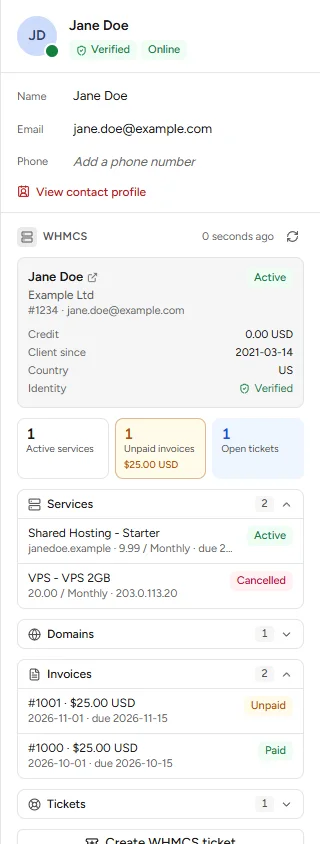
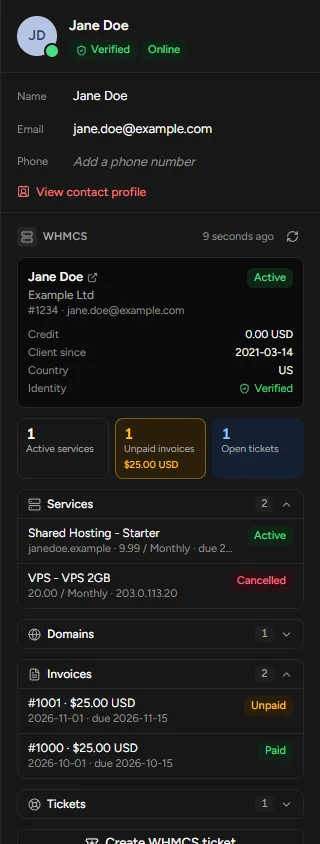
The visitor typed this email themselves. It was not proven by a signed-in session, so this WHMCS account may belong to someone else. Don’t share account or billing details until you’ve confirmed their identity.
Show anywayThe rest of IsTyping comes with it.
Walk a client through the control panel
Co-browsing shows you the page they’re on — passwords masked — and lets you point at the right setting.
Answer outages before the chats arrive
A status page with monitors and incidents, and a banner inside the chat while something is wrong.
What has been tested
The addon is written for WHMCS 8 and 9 on PHP 7.4 or later. It has its own PHP test suite, and IsTyping’s end-to-end tests drive it against a simulated WHMCS. It is not certified or endorsed by WHMCS, and we are not a WHMCS partner. Try it on a staging copy of your WHMCS first; the setup guide lists what to check.
WHMCS is a trademark of its owner, used here only to describe compatibility.
Put the chat where your clients already are.
Install the addon, connect the API, and your logged-in clients show up verified — with their account in view.